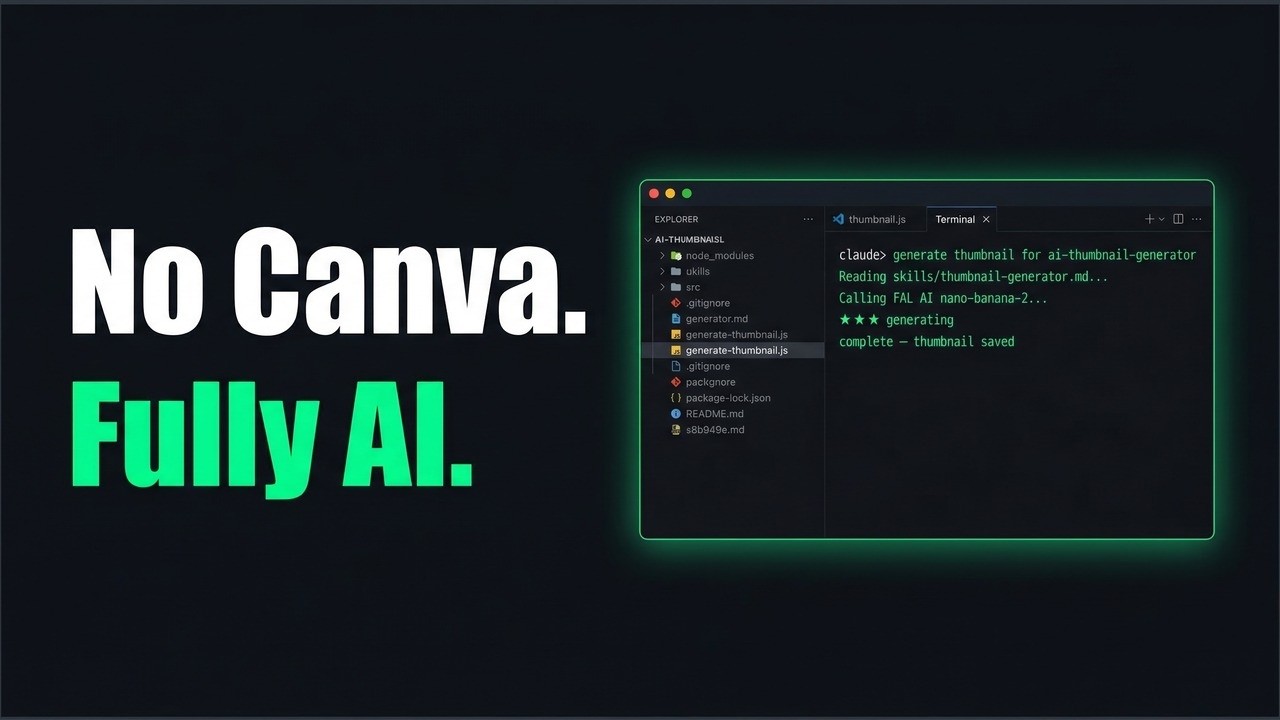
Thumbnails are the single biggest lever on YouTube CTR — and they were taking me 30 minutes every video. Open Canva, drag things around, export a version, decide it looks wrong, do it again.
I replaced that entire workflow with a two-file Claude Code system. One skill file, one script. The agent reads the video outline, applies research-backed CTR rules, writes the image prompt, and generates a finished 1280×720 thumbnail for $0.08. The full walkthrough is in the video below.
Why Thumbnails Are Your Biggest Lever
CTR is the most important variable in YouTube growth — more than title optimisation, more than tags, more than posting frequency. And thumbnails are the biggest driver of CTR.
The research on this is consistent: minimal text gets up to 30% higher CTR than text-heavy designs. More than three visual elements drops performance by 23%. Yet most creators either hire a designer, spend 30 minutes in Canva per video, or ship thumbnails that look like every other channel in their niche.
The bottleneck is partly time, partly skill, and partly not knowing which design decisions actually move the number. I was doing all three badly. I’d open Canva with a vague idea, move things around until something felt okay, export it, and live with the result.
The problem isn’t just the time cost — it’s that the output quality depends on taste and luck rather than a repeatable system. If you don’t have rules baked in, you’re making design decisions from scratch every week.
How the Two-File System Works
The system is two files: a skill file (skills/thumbnail-generator.md) and a Node script (Agents/generate-thumbnail.js).
The skill file is a set of instructions for Claude. When you say “generate a thumbnail for [video title]”, Claude reads the skill, walks through six steps — hook text, supporting text, visual, colour palette, prompt — and runs the script. No back-and-forth, no design decisions made on the fly. The rules are already there.
The script calls FAL AI’s Nano Banana 2 model (Gemini-based, reasoning-guided), which means you give it explicit text instructions and it validates them rather than hallucinating. You say text reading exactly "BUILT IN 2 HOURS" and it renders that text. It costs around $0.08 per image at 2K resolution and runs in about 10 seconds.
The output drops straight into outputs/[video-slug]/[video-slug]-thumbnail.jpg — ready to upload. This fits into the same pipeline I built for research and content planning, where every asset for a video lives in one slug folder.
The CTR Rules Baked In
The skill file isn’t a generic image prompt — it has the actual research baked in so you don’t have to make those calls yourself.
Text: Three words maximum, under 12 characters if possible. Lead with a number or outcome (“4 Hours Back”, “Built in 2 Hours”, “One Prompt, Done”). Tease, don’t summarise — the thumbnail isn’t a description, it’s a reason to click. Bold condensed font weight, no text in the bottom-right corner (YouTube’s duration badge covers it).
Layout: Maximum two to three visual elements total. Single focal point. Text left or top, visual right — this is the layout pattern that consistently outperforms others in the data. Everything must be readable at 120px wide because that’s the mobile browse grid.
Colour: Dark background (deep navy or charcoal) stands out against YouTube’s interface. High contrast — minimum 4.5:1 text-to-background ratio. White text with yellow or cyan accent gets the eye reliably. Red or yellow highlights add another 20% CTR boost on average.
These aren’t preferences. They’re in the skill file as hard rules, so Claude applies them to every thumbnail without you having to remember them.
Setup in Under 5 Minutes
You need a FAL AI account (free tier available at fal.ai), a FAL_KEY added to your shell profile or .env, and Node installed.
export FAL_KEY=your_key_here
cd "[YOUR_WORKSPACE]/Agents" && npm install
Then invoke via Claude Code:
Generate thumbnail for "Build a Research Agent in 2 Hours"
Notes: Claude Code agent, pulls trending topics, saves to content pipeline. Main output: a list of 10 video ideas with research attached.
Claude reads the skill, builds the prompt, and runs the script. The thumbnail lands in your outputs folder in about 10 seconds.
If you haven’t set up Claude Code as a working environment yet, the Claude Cowork setup walkthrough covers the full workspace structure.
What Changes When Thumbnails Stop Being a Bottleneck
The obvious change is time. Thirty minutes to ten seconds. But the more useful change is consistency — every thumbnail now goes through the same quality check. The same rules, the same visual style, the same prompt structure.
You can also iterate faster. Generate three variants with different hook text in the same session, pick the best one, move on. With Canva, a second attempt means another 25 minutes. With the agent, it’s another $0.08 and another prompt.
The skill file is below — paste it, customise the placeholders for your channel, and it’s ready to use.
How to Install This
Three things you need before the agent will run:
- A FAL AI key — free account at fal.ai/dashboard/keys, then add
export FAL_KEY=your_key_hereto your shell profile or.env - The generate-thumbnail.js script — covered in the video walkthrough, save it to
Agents/generate-thumbnail.jsin your workspace, then runnpm installin that folder - The skill file below — paste into
skills/thumbnail-generator.md, swap the[PLACEHOLDER]values for your channel
Quickest way — paste this to Claude Code and it handles steps 2 and 3 automatically:
Install the thumbnail generator skill in this workspace. Please:
1. Save the skill file below as `skills/thumbnail-generator.md` — swap any [PLACEHOLDER] values for my channel before saving (ask if anything is unclear)
2. Add the CLAUDE.md snippet (further below) to my existing CLAUDE.md file
3. Check if FAL_KEY is in my .env file or shell profile and tell me if it's missing
4. Check if Agents/generate-thumbnail.js exists and tell me if it's not there yet

[paste the skill file content here]

[paste the CLAUDE.md snippet here]
The Skill File
Copy this into skills/thumbnail-generator.md in your Claude Code workspace.
# Skill: Thumbnail Generator

> Generates a production-ready YouTube thumbnail via FAL AI (Nano Banana 2). Takes the video title and notes as input, crafts a CTR-optimised prompt, generates the image, resizes to 1280×720px, and saves it with an SEO-friendly filename. No Canva step needed.

---

## How to Invoke

Say: *"Generate thumbnail for [video title]"*

**What to provide:**
1. The video title
2. Notes on what the video covers (the hook, main outcome, what's built/shown)
3. **Optional but recommended:** Paste a screenshot from your recording into the chat

---

## Context to Read First (optional)

If you have brand or style reference files in your workspace, read them first:
- `[YOUR_BRAND_FILE]` — e.g. `brand/channel-context.md`
- `[YOUR_DESIGN_SYSTEM_FILE]` — e.g. `brand/design-system.md`

If you don't have these files, proceed using the CTR rules and visual guide below.

---

## Screenshot Handling

If the user pastes a screenshot from their recording into the chat:
- Analyse exactly what is on screen — terminal output, n8n nodes, Claude Code file tree, a results dashboard, etc.
- Identify the most visually distinctive elements: colours, layout, specific text visible, any notable outputs
- Use this to write a precise visual description in the prompt

---

## Research-Backed CTR Rules

### Text rules
- **3 words max.** Ideally under 12 characters total. Minimal text gets +30% CTR vs text-heavy
- Lead with a **number or outcome**: "4 Hours Saved", "Built in 2 Hours", "3 Agents, 1 System"
- **Tease, don't summarise** — create curiosity, not a synopsis
- Bold condensed font style (Impact/Bebas Neue weight) — readable at 120px wide
- **No text in the bottom-right corner** — YouTube's duration badge covers it

### Layout rules
- **Max 2–3 visual elements total** — more than 3 drops CTR by 23%
- **Single focal point**
- Text left/top, visual right
- Readable at ~120px wide (mobile browse grid)

### Colour rules
- **High contrast** — minimum 4.5:1 text-to-background ratio
- Best combos for dark backgrounds: **white text + yellow accent**, or **white + electric cyan**
- **Dark background** — stands out against YouTube's interface

### Channel-specific notes
- Adapt to your style: `[YOUR_CHANNEL_STYLE]`
  - Example: "no face, AI/automation content, IDE-heavy visuals, dark tech aesthetic"
  - Example: "facecam channel, reaction shot on left, graphic on right"

---

## Step 1 — Choose the Hook Text (3 words max)

**Good patterns:**
- Time saved: "4 Hours Back", "Built in 2 Hours"
- Automation outcome: "Fully Automated", "Zero Manual Work"
- Scale/leverage: "3 Agents, 1 System", "One Prompt, Done"
- Curiosity/contrast: "No Code Needed", "Simpler Than You Think"

---

## Step 2 — Optional Supporting Text (3–4 words max)

Smaller secondary line below main text, in accent colour.

Examples:
- Main: "4 Hours Back" → Supporting: "with Claude Code"
- Main: "Fully Automated" → Supporting: "My Entire SEO Workflow"

---

## Step 3 — Define the Visual

Pick the **single most visually impressive moment** from the video.

| Visual type | When to use |
|-------------|-------------|
| IDE dark theme window | Claude Code builds, agent runs, script demos |
| n8n workflow — colourful nodes | n8n automation videos |
| Terminal output panel | Script outputs, command-line demos |
| Side-by-side before/after | Transformation videos |
| Dashboard with a number | ROI, metrics, results-focused videos |

**Describe precisely:** not "a glowing terminal" but "an IDE window in GitHub dark theme, left panel showing the file tree, right panel showing Claude Code output in green monospace text, subtle cyan glow"

---

## Step 4 — Choose the Colour Palette

| Accent | When to use |
|--------|-------------|
| Electric blue / cyan | Claude Code content (default) |
| Neon green | Automation outputs, results |
| Orange | Transformation, before/after |
| Yellow | Number-led titles |

---

## Step 5 — Write the Nano Banana 2 Prompt

**Prompt template:**
```
YouTube thumbnail, 1280x720, 16:9 landscape. Maximum mobile CTR design.

BACKGROUND: Pure flat solid #0d1117 (deep dark). No texture, no grid, no pattern.

TEXT — top-left area:
Large bold condensed white sans-serif (Impact weight) text reading exactly "[MAIN TEXT]"
Below it, smaller [#FFD700 yellow / #00D4FF cyan] text reading exactly "[SUPPORTING TEXT]"
Text is high-contrast, readable at small thumbnail size. No text in bottom-right corner.

VISUAL — right 55–60% of image:
[Specific visual description from Step 3]

Style: Professional [YOUR_CHANNEL_NICHE] YouTube channel. Exactly 2 visual elements. Clean, minimal, high contrast. No human faces. [Accent colour] glow on the tech visual only. The thumbnail must immediately communicate "[TWO SECOND MESSAGE]" at a glance.

NEGATIVE: No background texture, grid, dots, or pattern. Background must be flat #0d1117. No more than 2 accent colours total.
```

---

## Step 6 — Run the Script

```bash
cd "[YOUR_WORKSPACE_PATH]/Agents"
FAL_KEY=$FAL_KEY node generate-thumbnail.js "[full prompt]" "[video-slug]"
```

If FAL_KEY is not set: `export FAL_KEY=your_key_here`

FAL AI keys: https://fal.ai/dashboard/keys

---

## Output

Script saves to: `outputs/[YOUR_VIDEO_SLUG]/[YOUR_VIDEO_SLUG]-thumbnail.jpg`

Report back:
```
✅ Thumbnail generated
📁 File: outputs/[video-slug]/[video-slug]-thumbnail.jpg
📏 1280×720px JPEG — ready to upload to YouTube
🔤 Text used: "[MAIN TEXT]" / "[SUPPORTING TEXT]"
👁 Two-second message: [what it communicates at a glance]
💰 Cost: ~0.08 USD
💡 A/B suggestion: [optional alternative hook text]
```

---

## Setup (first time only)

1. Get a FAL AI API key: https://fal.ai/dashboard/keys
2. Add `generate-thumbnail.js` to your `Agents/` folder (script in the video walkthrough)
3. Run: `cd "[YOUR_WORKSPACE_PATH]/Agents" && npm install`
4. Add to shell profile: `export FAL_KEY=your_key_here`

Cost: ~0.08 USD per thumbnail at 2K resolution
Add This to Your CLAUDE.md
## Thumbnail Generator

Generates a production-ready YouTube thumbnail using FAL AI (Nano Banana 2). No Canva needed.

**Skill file:** `skills/thumbnail-generator.md`

**How to invoke:** Say "Generate thumbnail for [video title]" — optionally paste a screenshot from your recording for a more accurate visual.

**Prerequisites:**
- FAL AI account + API key (https://fal.ai) — add `export FAL_KEY=your_key` to your shell profile
- `Agents/generate-thumbnail.js` script (see the video walkthrough)
- Run `npm install` in `Agents/` once

**Output:** `outputs/[video-slug]/[video-slug]-thumbnail.jpg` — 1280×720px JPEG, ready to upload to YouTube

**Cost:** ~0.08 USD per image
Watch the full build: I Replaced Canva With a Claude Code Thumbnail Agent
If you’re building the full content pipeline, the research agent walkthrough covers how topic research, content planning, and thumbnail generation connect into one system.